Building an AI-Native Workflow with Orca and Obsidian
Introduction
Recently, I've been thinking a lot about how AI is changing the way we develop software.
With tools like Claude Code and OpenAI Codex, we're no longer limited to writing every line of code ourselves.
Instead, we can delegate tasks to AI agents, run multiple investigations in parallel, and spend more time focusing on architecture, problem-solving, and decision-making.
But as I started using AI coding agents more frequently, I noticed something interesting.
Our development tools and workflows aren't always designed around the way we now work with AI.
There were two problems I kept running into:
- Managing multiple terminals, agents, and projects was becoming increasingly complicated.
- Every time I started a new AI session, I often had to provide the same context or repeat previous investigations.
That's why I started experimenting with Orca + Obsidian.
Not because I wanted to add more tools to my setup, but because I wanted to rethink how my development environment should work in the AI era.
From Ghostty to Orca: Managing Agents Instead of Terminals
Before discovering Orca, I had been using Ghostty.
Ghostty is a great terminal emulator.
It's fast, responsive, and offers a much better experience than what I was used to with the default macOS Terminal.
But as I started running more AI coding agents, I realized that terminal performance wasn't my biggest problem anymore.
It was workflow management.
Keeping parallel work organized
Imagine working on a project with Claude Code implementing a feature, Codex investigating a bug, and a development server running in the background.
Now imagine switching to another project while those tasks continue running.
Even with tabs and split panes, keeping track of all these sessions can become distracting.
That's where Orca caught my attention.
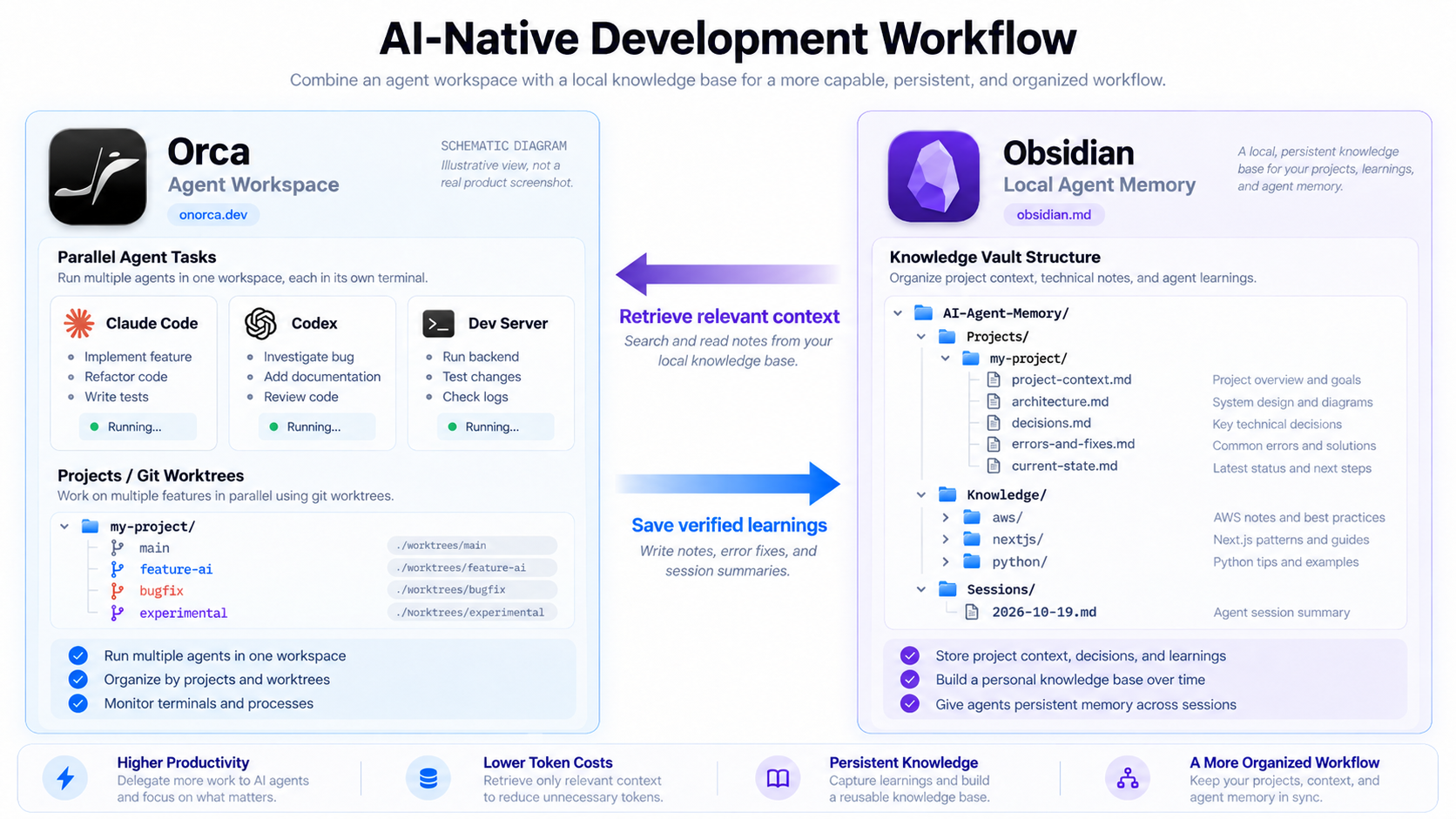
Orca is an agent-focused development environment that allows multiple coding agents to run within an organized workspace.
Instead of constantly switching between terminal windows, I can organize agents by project and task, while using Git worktrees to separate parallel code changes when needed.
The biggest difference for me isn't just running multiple agents.
It's moving from a terminal-centric workflow to a task-centric workflow.
Rather than focusing on managing windows, I can focus on what each agent is supposed to accomplish.
The Bigger Problem: AI Agents Don't Always Remember
Even with a more organized workspace, another problem remains.
AI coding sessions don't automatically share a persistent memory of everything that happened before.
Let's say I spend an hour debugging an AWS-related issue.
During that session, an agent may have searched documentation, investigated several potential causes, tried solutions that failed, and finally identified the root cause.
A few days later, I open a new session to work on a related problem.
If none of that knowledge was saved and retrieved, the agent might repeat the same investigation.
This means more time, unnecessary context rebuilding, and potentially additional token consumption.
And that's when I started asking myself:
Why should every new AI session have to rediscover something we've already learned?
Why I'm Using Obsidian as Local Agent Memory
Obsidian gives me a simple way to organize knowledge locally through Markdown files.
I can store information such as project architecture, technical decisions, debugging experiences, useful commands, and summaries of previous development sessions.
The idea is to turn those notes into reusable context for future AI coding tasks.
However, Obsidian alone doesn't automatically give Claude Code or Codex persistent memory.
The workflow needs an integration layer that allows agents to search, read, and update those notes, whether through authorized filesystem access or Obsidian's CLI.
Retrieve, verify, and save
My goal is to make this process simple:
- Before development: Retrieve relevant project context and previous findings.
- During development: Use that information to avoid unnecessary repeated investigations, while verifying that it is still accurate.
- After development: Save important findings, resolved errors, technical decisions, and next steps.
That way, when another coding session begins, the agent has a starting point instead of always starting from scratch.
Putting Everything Together
This is how I think about the relationship between the two tools:
- Orca = Where my AI agents work.
- Obsidian = Where reusable development knowledge lives.
With Orca, I can organize multiple agents and development tasks.
With Obsidian, I can build a local knowledge base that can be reused across sessions.
Together, they form the foundation of the AI-native workflow I'm experimenting with.
Selective context retrieval
One important detail is that more context isn't always better.
Loading unnecessary notes can actually increase token consumption.
The goal is selective retrieval: providing each agent with only the information relevant to its current task.
I'm still exploring how much time and token usage this approach can save in practice.
Final Thoughts
The more I work with AI coding agents, the more I realize that software development is evolving beyond simply writing code faster.
We're also learning how to design environments where AI agents can work together effectively, reuse knowledge, and support better engineering decisions.
I don't think the future of development is about launching as many agents as possible.
It's about orchestrating agents effectively, preserving useful knowledge, and knowing how to validate their work.
And that's what makes experimenting with tools like Orca and Obsidian so interesting to me.
Perhaps the next step in AI-assisted development isn't just a more powerful model.
It's a better workflow around the model.